See MatchVault In Action

One workflow for recording, organizing, and reviewing every match.

MatchVault gives wrestling programs a simpler way to capture matches on event day, keep film organized after upload, and bring the right clips back into practice all season.

Capture on the mat edge

Record with match context already attached, not scribbled in later.

Keep video organized automatically

Uploads, tags, and team structure stay connected from the first tap.

Review faster with staff and athletes

Search, filter, download, and replay without digging through camera rolls.

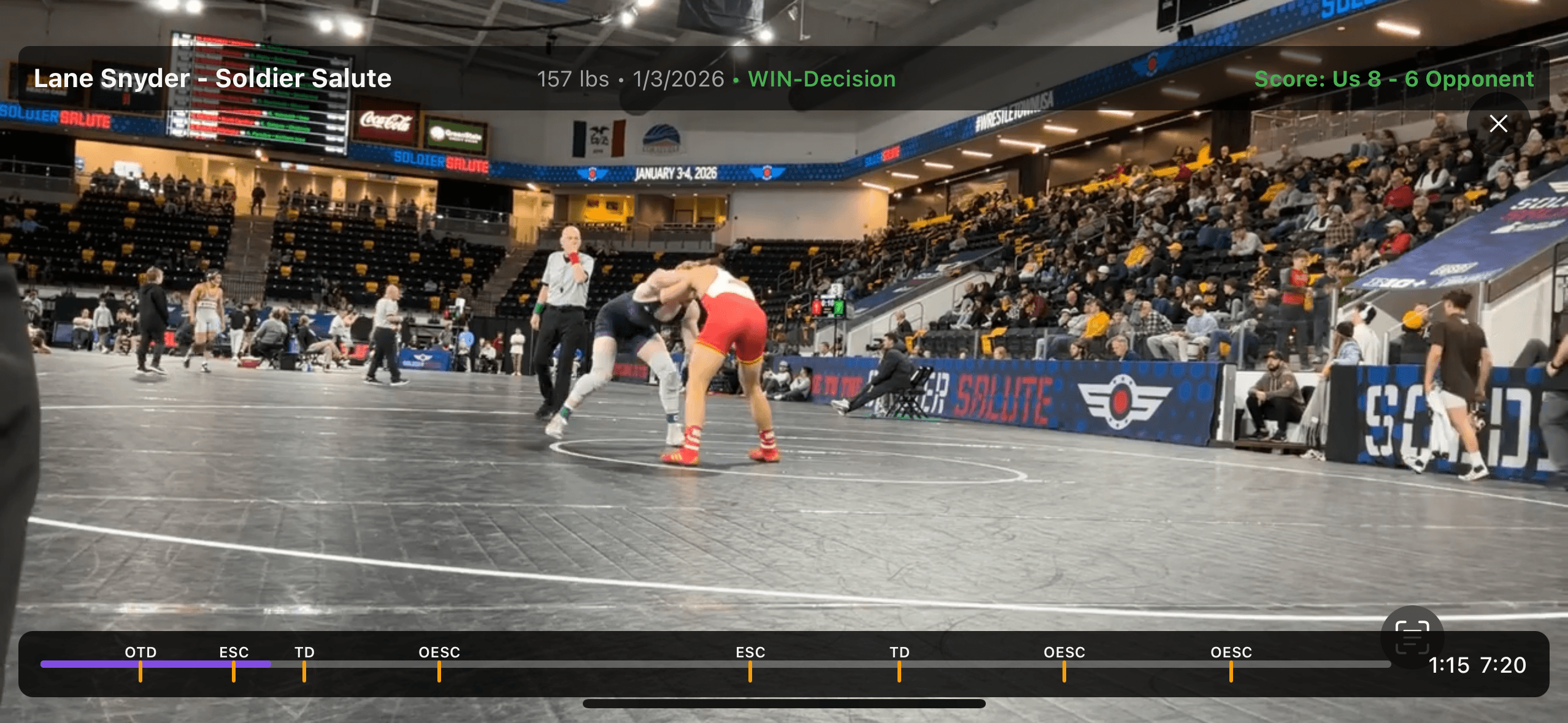
Match Replay

Review film with score, result, and timeline context on screen

Open a match and get straight to the moments that matter with replay context that helps coaches, athletes, and staff review faster.

Replay view showing a live wrestling match with score, result, and timeline markers.

Match-Day Workflow

Keep meet-day recording organized from the first bout to the final upload

MatchVault gives your staff a clean way to prepare matches, capture the right details, and manage uploads without slowing down the sideline.

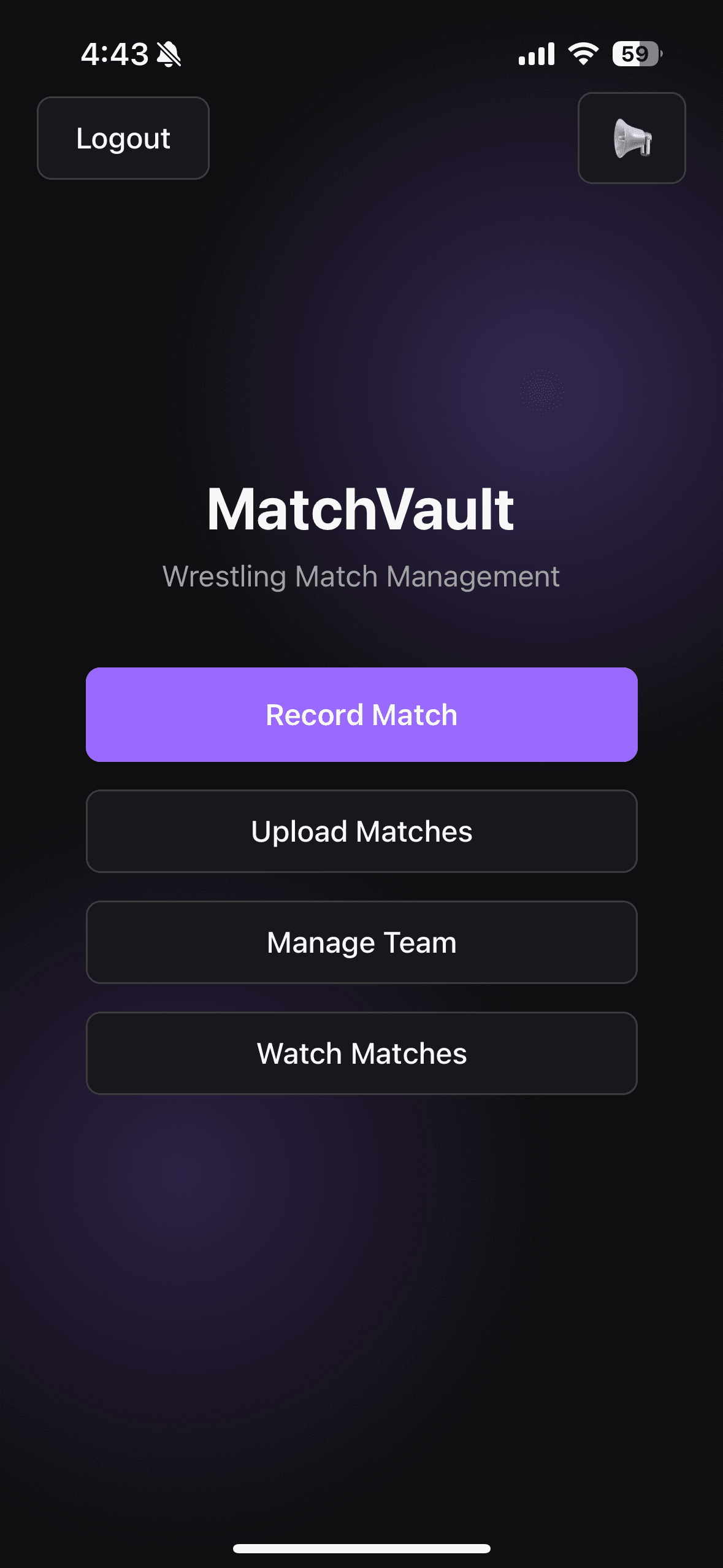
01 · Home Hub

Give every coach the full workflow from one screen

The app opens to four clear actions so staff can move from recording to upload to team management without hunting through menus.
Already filled matches list showing queued bouts ready for recording.

Screen

MatchVault

Wrestling Match Management

Record MatchUpload MatchesManage TeamWatch Matches

Primary Actions

Record MatchWatch Matches
Single-screen navigation for capture, upload, roster, and replay.
Simple enough for assistant coaches and team managers on day one.
02 · Match Setup

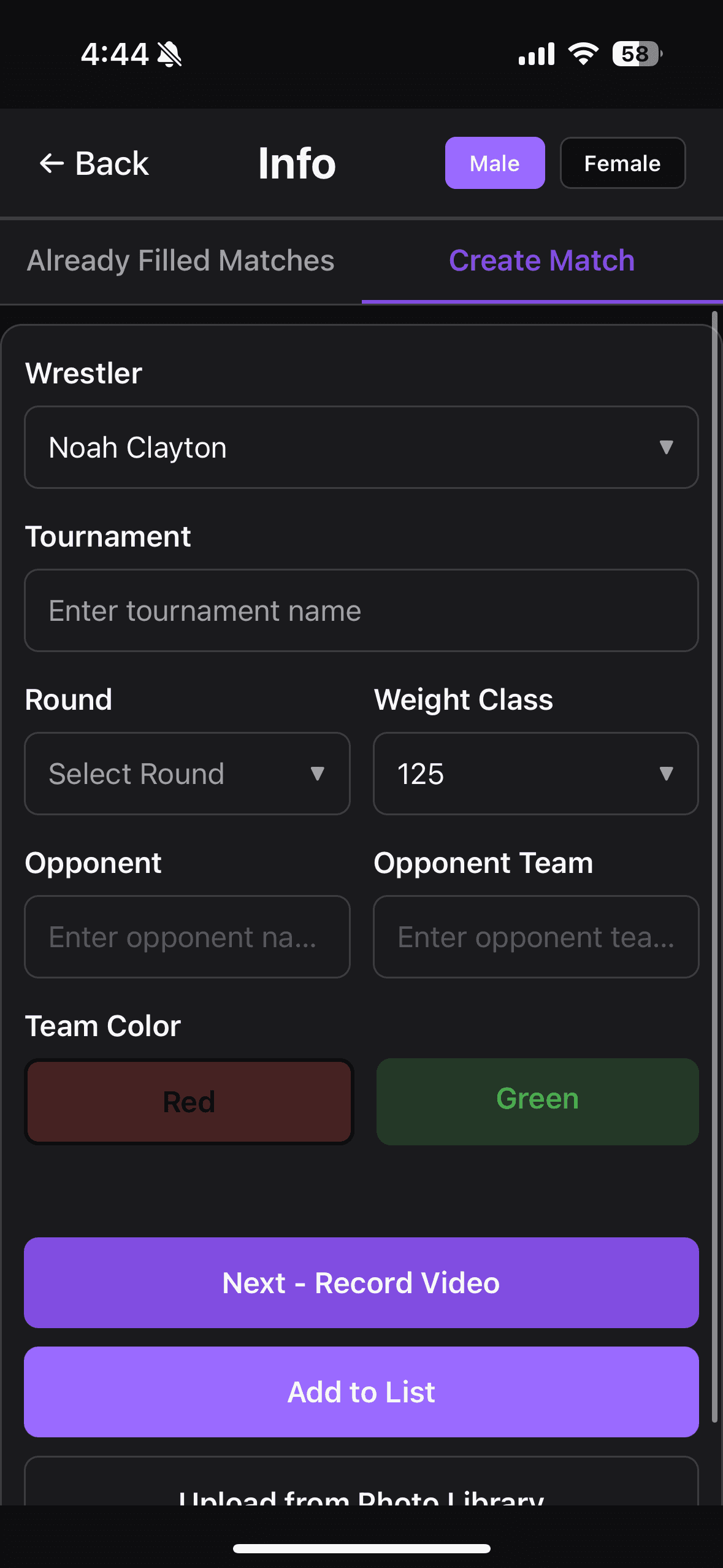
Tag the details before you ever hit record

Wrestler, tournament, round, weight, opponent, and team color are captured up front so every video lands in the right place later.

Create match screen with wrestler, tournament, round, weight class, and opponent fields.

Screen

Create Match

Build the record before the whistle

WrestlerTournamentRoundWeight ClassOpponentOpponent Team

Primary Actions

Next - Record VideoAdd to List
Pre-tagged recordings keep the library organized automatically.
Supports quick switching between match recording and list building.

03 · Queued Bouts

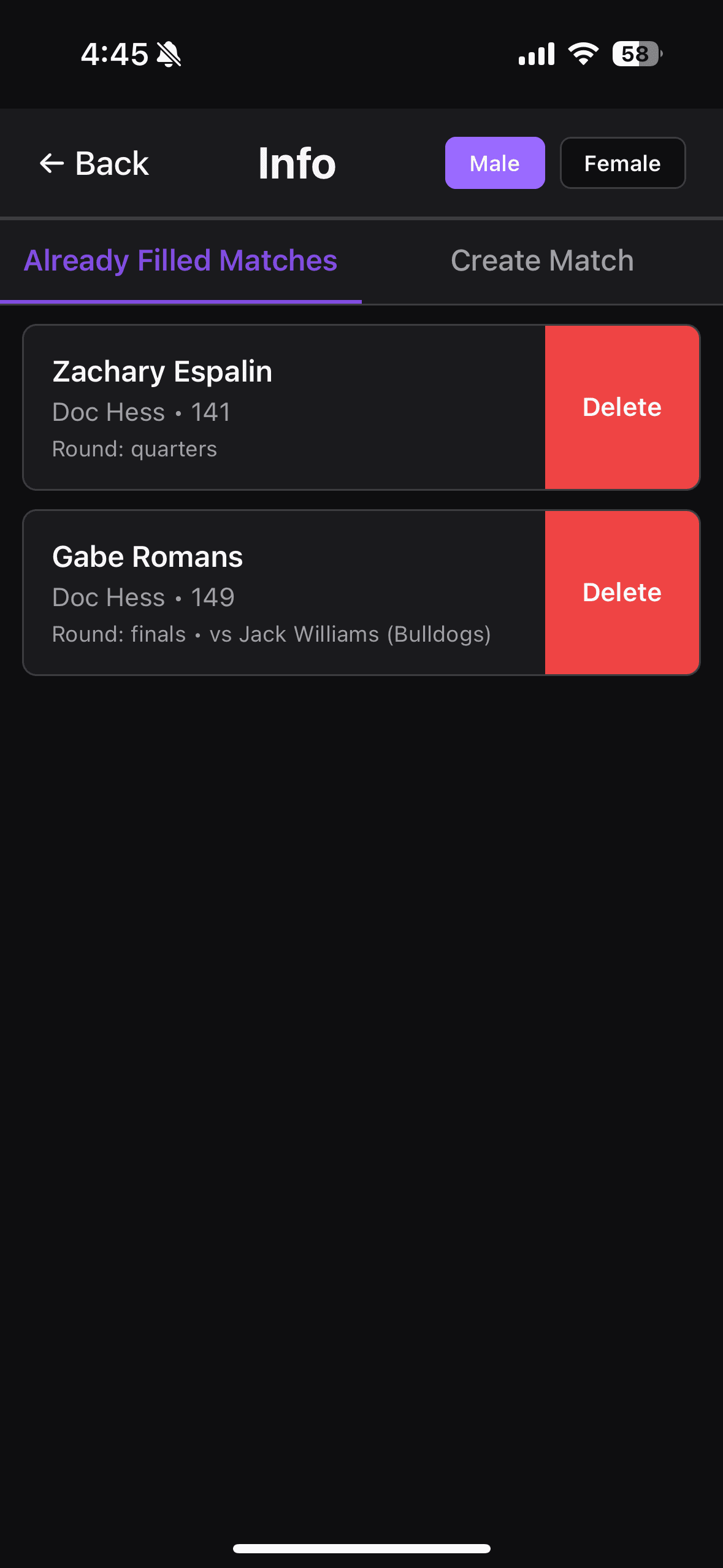
Stack upcoming matches when tournaments get busy

Already filled matches let staff queue multiple wrestlers in advance so the next recording is ready before the current one ends.

MatchVault home screen with record, upload, team management, and watch match actions.

Screen

Already Filled Matches

Prepared cards waiting for recording

Zachary EspalinGabe RomansRound + weight detailsQuick delete controls

Primary Actions

Ready to RecordDelete
Ideal for tournament sessions with back-to-back bouts.
Cuts down on rushed data entry between matches.

04 · Recording Controls

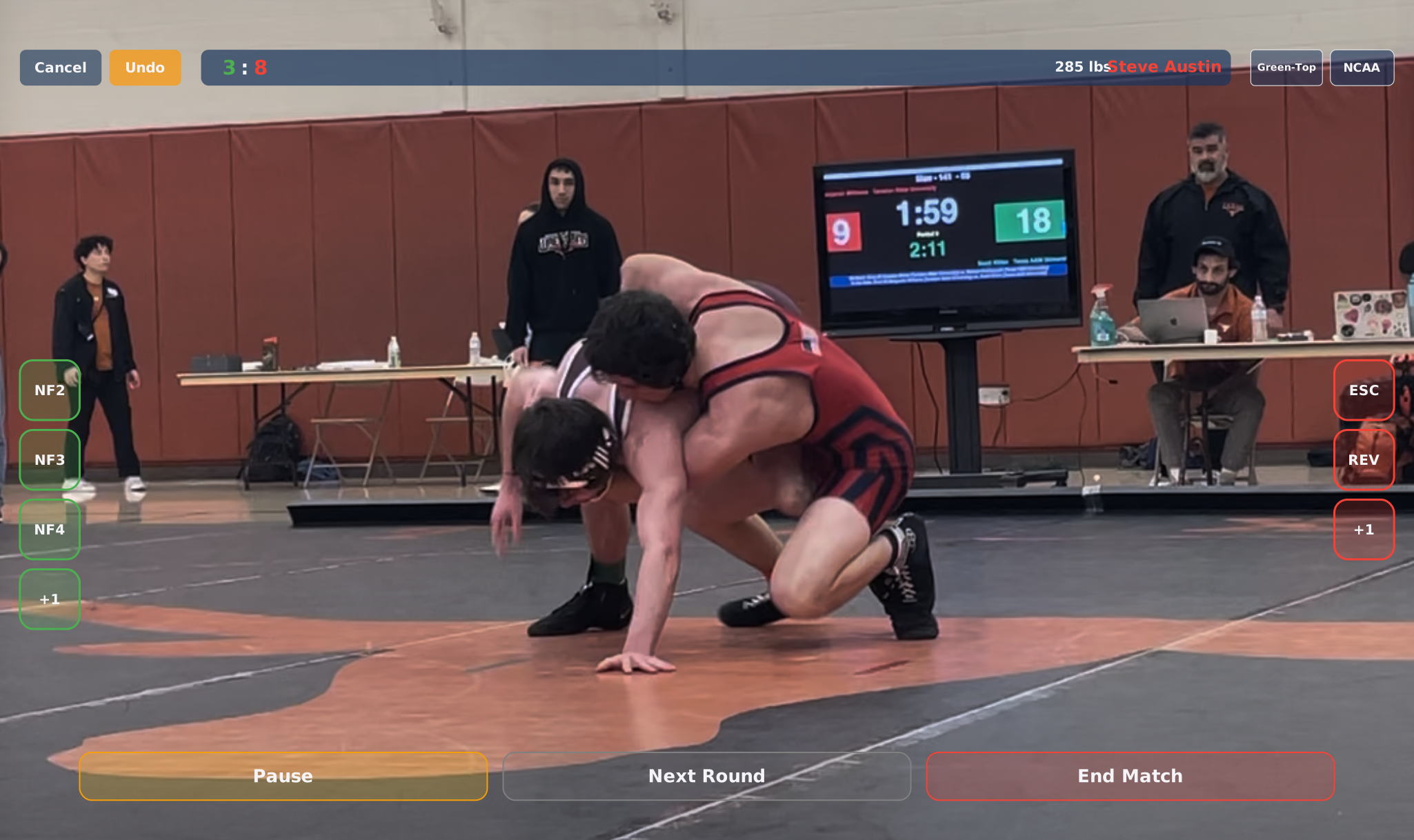
Keep scoring, corrections, and match context available while you record

The live recording overlay gives staff the controls they need during the bout, without leaving the camera workflow or losing the match context already attached to the video.

Recording overlay showing live score, wrestler details, undo controls, and event buttons during a match.

Screen

Recording Overlay

Live score, wrestler details, and event controls on one screen

CancelUndoLive scoreWeight classDivisionEvent buttons

Primary Actions

Live RecordingUndo
Keep live score, wrestler identity, weight class, and division visible while the camera is rolling.
Mark scoring actions from the overlay so the match already has useful review context when it is uploaded.
Use cancel and undo controls to correct mistakes quickly without breaking the recording workflow.

05 · Local Queue

Upload in batches after the mat-side rush is over

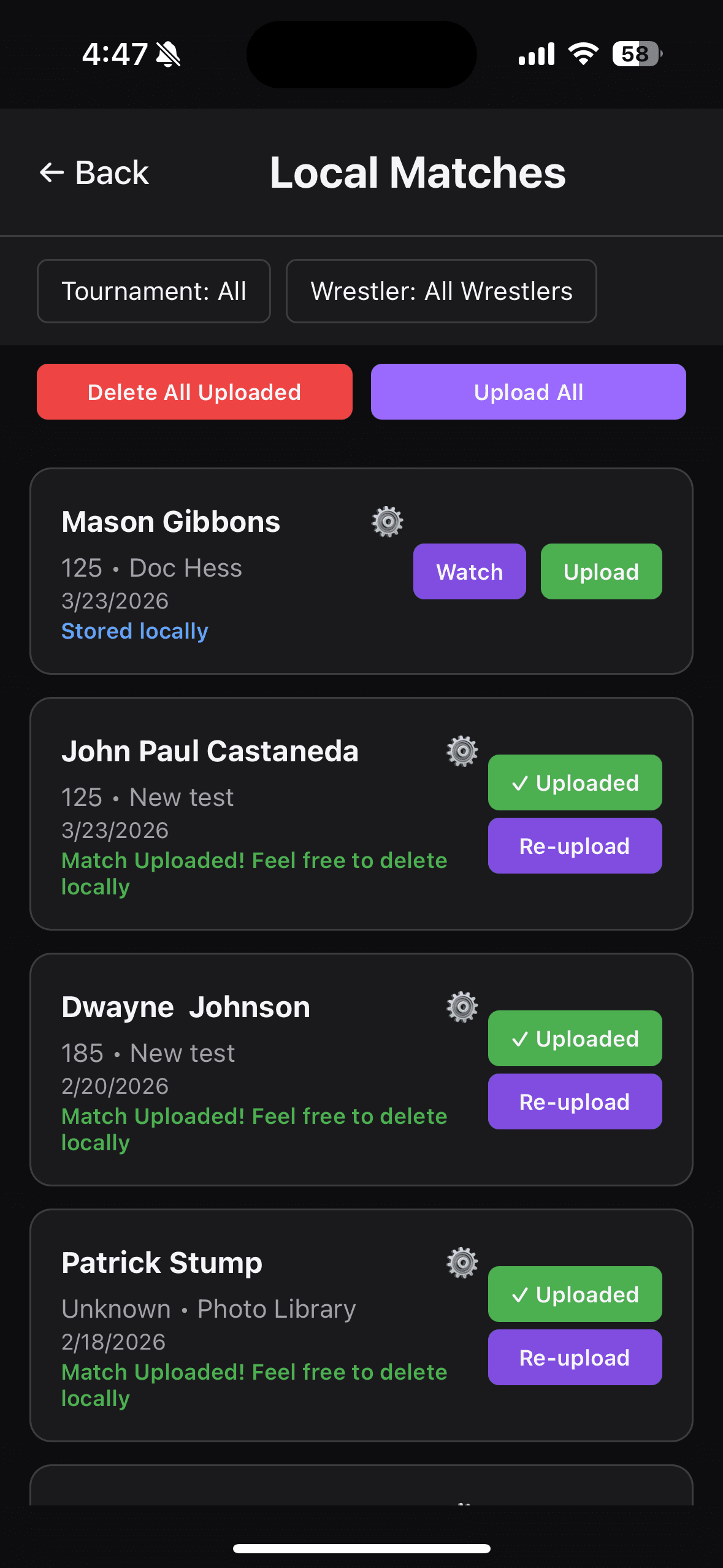
Local match storage keeps recordings on the device, shows upload status, and lets staff bulk upload or re-upload with confidence.

Local matches screen showing upload status, upload all, and re-upload actions.

Screen

Local Matches

Stored locally with upload status

Delete All UploadedUpload AllUploadedRe-upload

Primary Actions

Upload AllRe-upload
Bulk actions reduce cleanup work after an event.
Status labels make it obvious what is safely in the cloud.

Team Film Library

Give your coaches and athletes fast access to the right match

Search by wrestler or event, clean up match details, and keep important film ready for review wherever your team needs it.

06 · Match Library

Turn every recording into a searchable match list

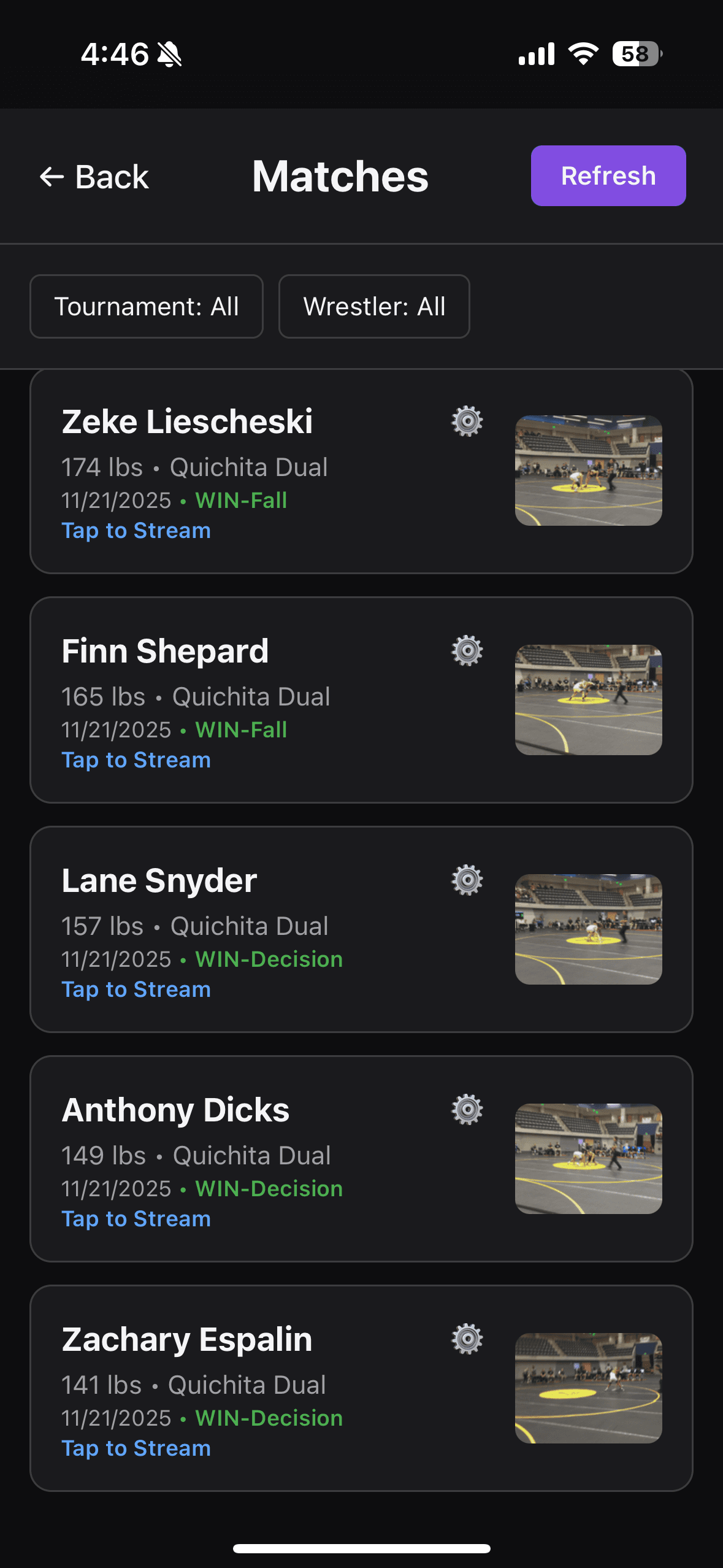
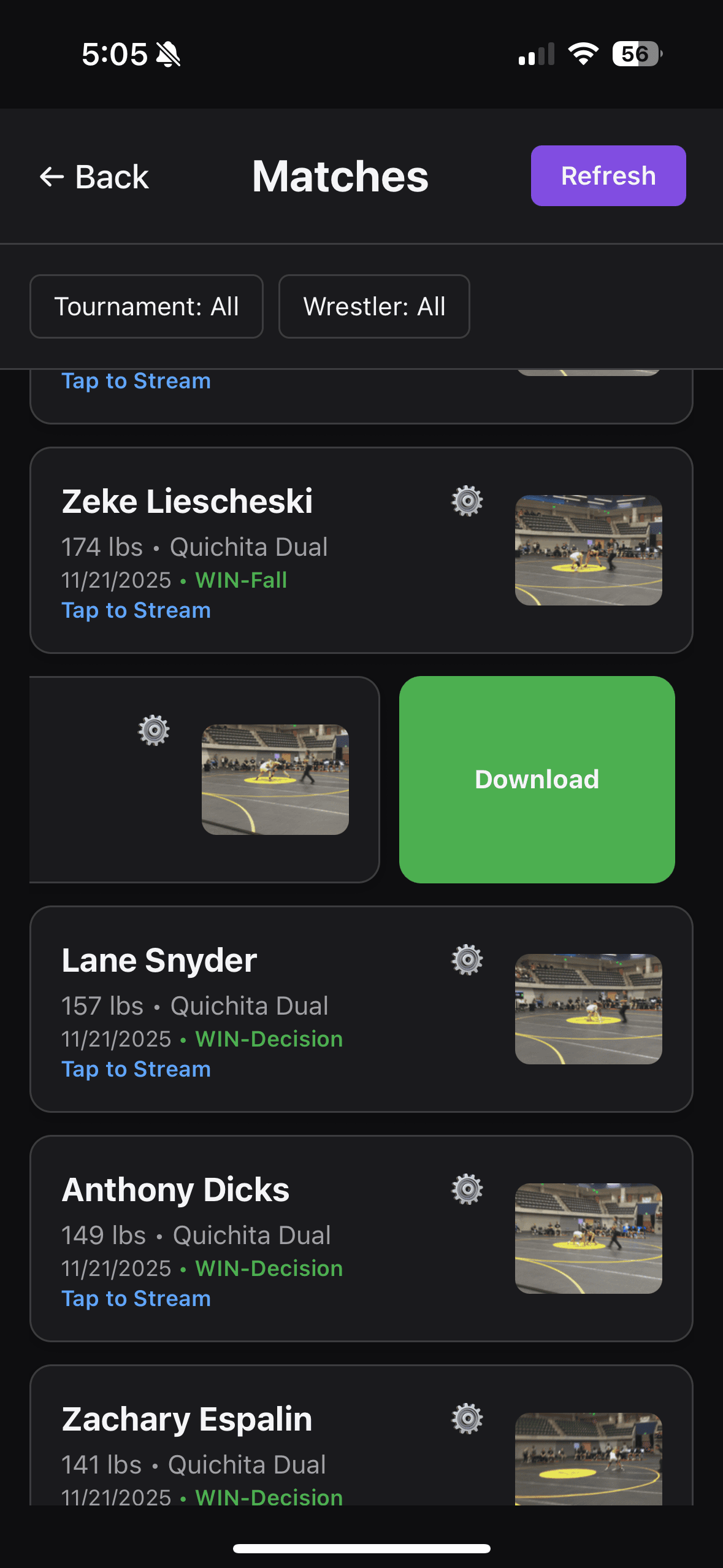
The library view surfaces thumbnails, event names, dates, and results so coaches can open the right match in seconds.

Match library screen with thumbnails, results, and tap to stream links.

Screen

Matches

Tournament, wrestler, and result-aware library

Tap to StreamResult statusThumbnail previewFast refresh

Primary Actions

Tap to StreamRefresh
Instant visual scanning with thumbnails and outcomes.
Built for fast retrieval during practice, scouting, and review.

07 · Wrestler Filter

Narrow the library down to one athlete instantly

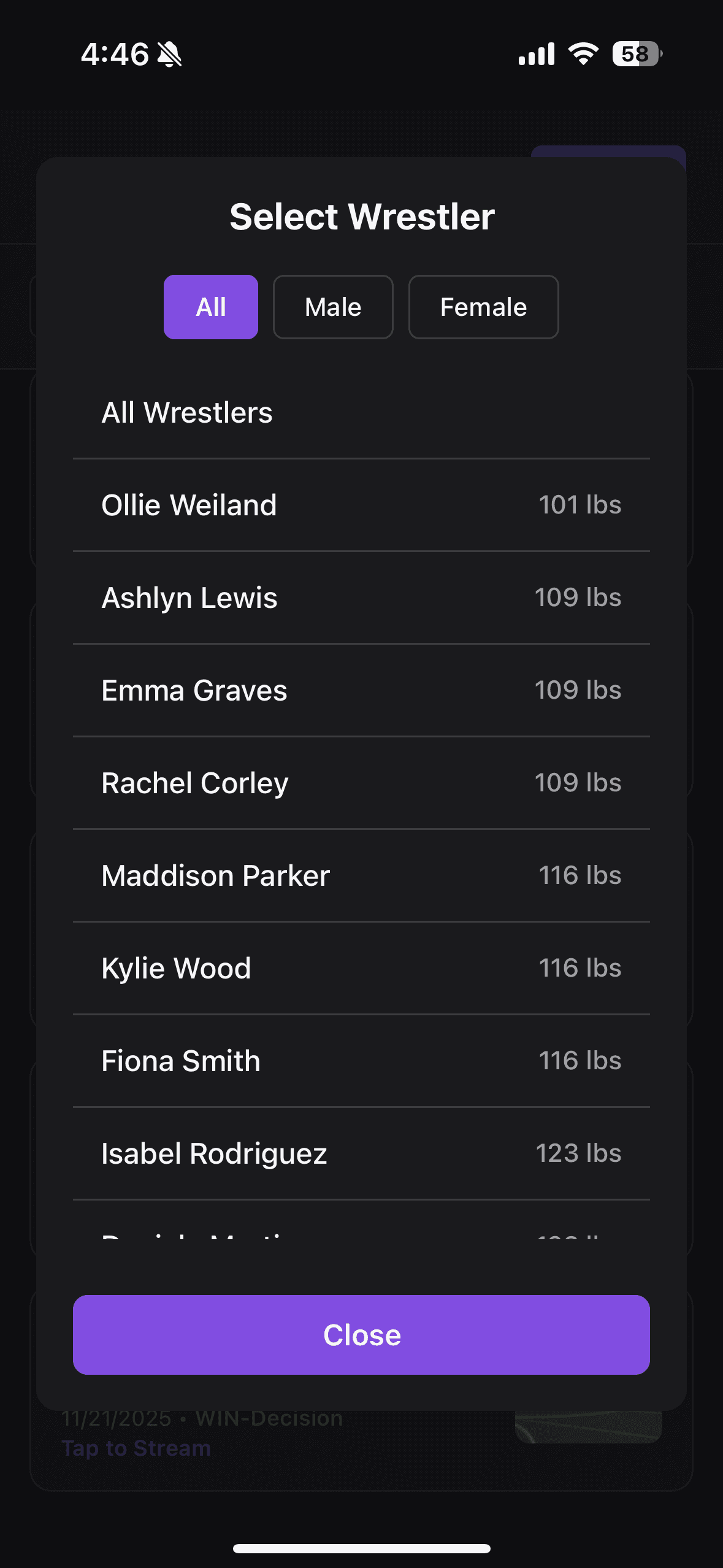
Coaches can filter by wrestler and split the list by male or female rosters when they only want one athlete’s film.

Wrestler filter modal with all, male, and female roster options.

Screen

Select Wrestler

All, male, or female athlete views

All WrestlersWeight listed beside each nameMale / Female filterQuick close

Primary Actions

All WrestlersClose
Useful for athlete meetings and individual development plans.
Roster-aware filtering keeps growing libraries manageable.

08 · Tournament Filter

Jump from an entire season down to one event

Tournament filtering makes it easy to review duals, opens, and invitationals separately instead of scrolling through everything at once.

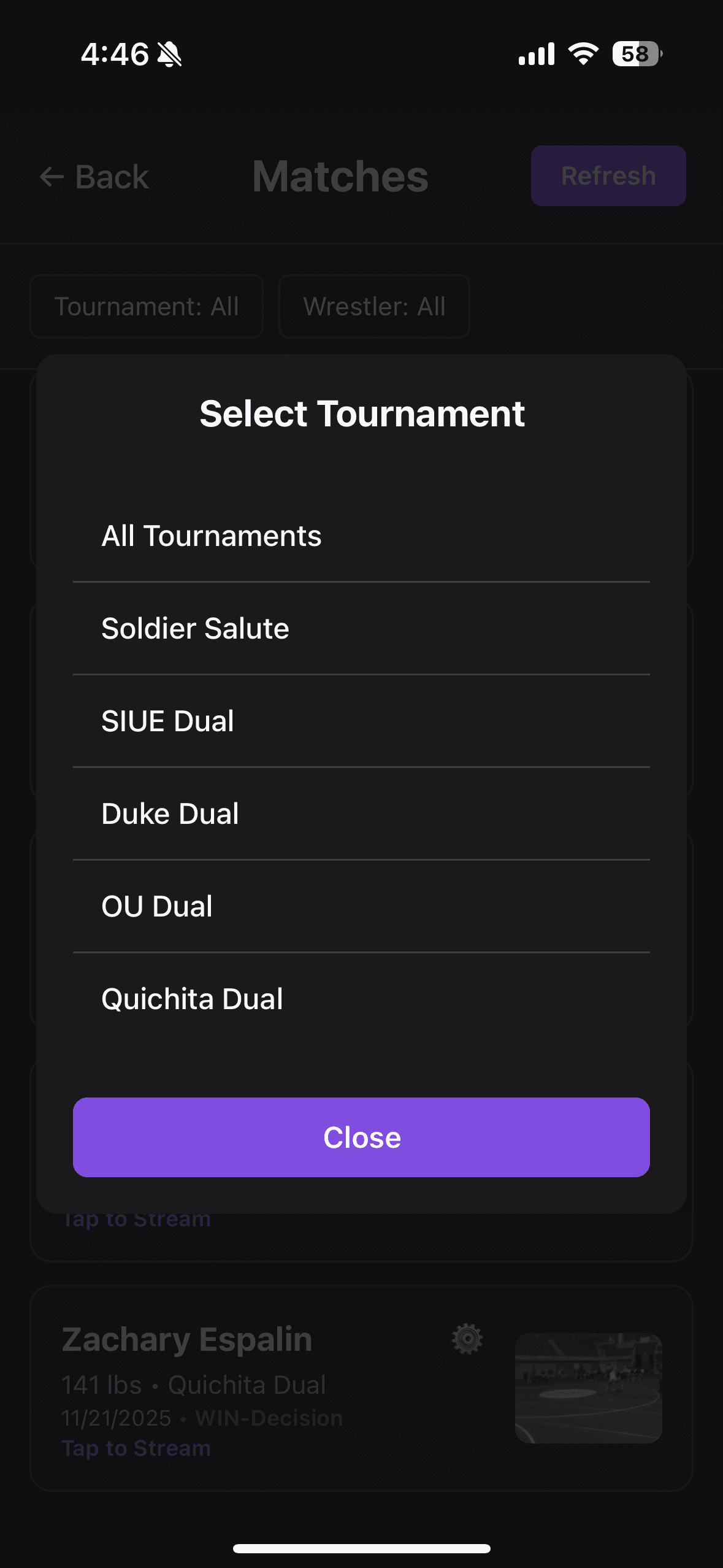
Tournament filter modal listing events like Soldier Salute and duals.

Screen

Select Tournament

Choose one event or view all

Soldier SaluteSIUE DualDuke DualQuichita Dual

Primary Actions

All TournamentsClose
Perfect for event-specific breakdowns after a tournament weekend.
Lets staff compare performance by competition instead of by date alone.

09 · Offline Access

Pull key matches down when you need them on the road

Downloaded video states make it clear when a match is ready for offline use without losing the context of the full cloud library.

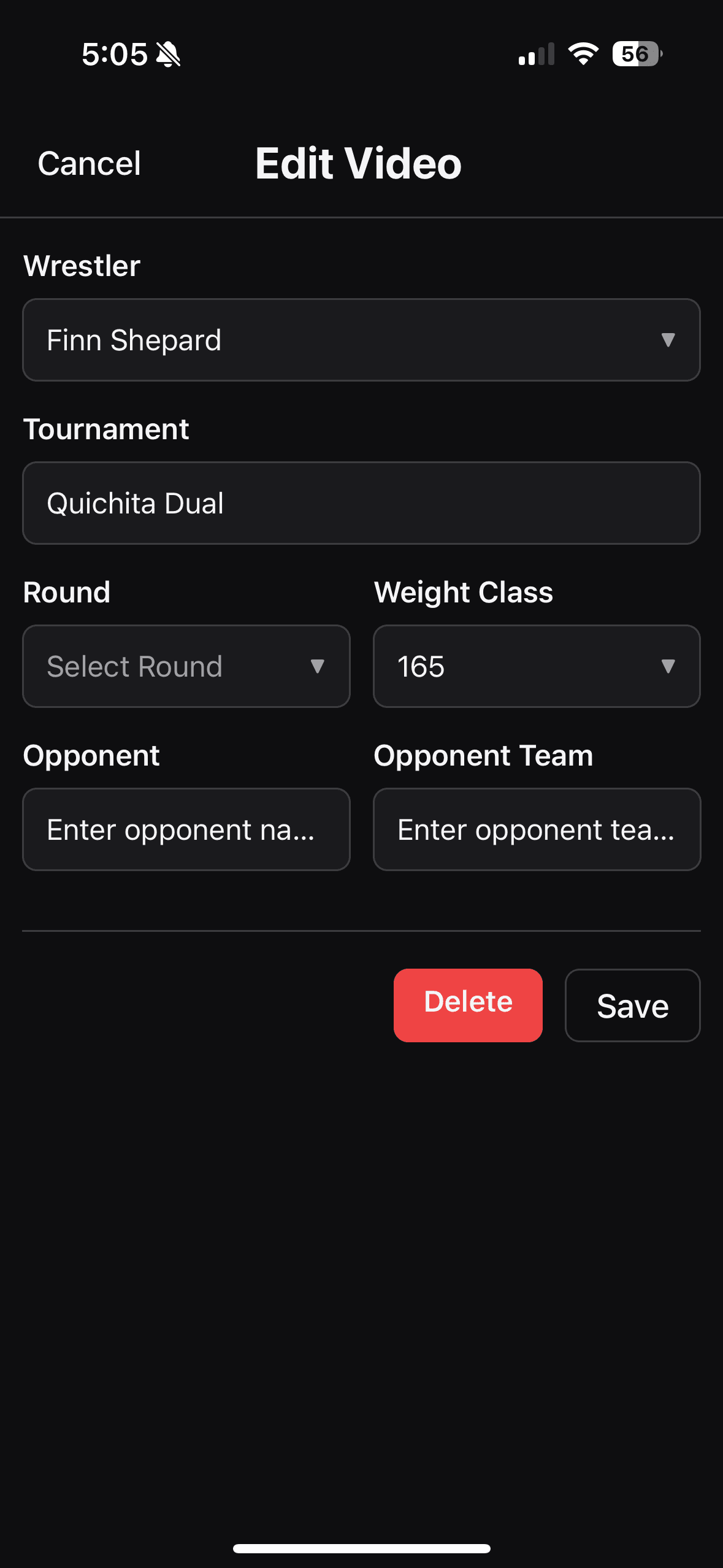
Edit video screen for updating wrestler, tournament, round, weight, and opponent metadata.

Screen

Download Match

Cloud library with device-ready access

DownloadTap to StreamThumbnail previewResult status

Primary Actions

DownloadTap to Stream
Useful for travel, poor Wi-Fi venues, and pre-meet prep.
Keeps the same match context whether content is streamed or stored locally.

10 · Metadata Editing

Fix titles and opponent details without touching the video

When something changes after upload, staff can edit the match metadata instead of deleting the recording and starting over.

Matches screen showing a large download action for offline access.

Screen

Edit Video

Update tags without re-recording

WrestlerTournamentRoundWeight ClassOpponentOpponent Team

Primary Actions

SaveDelete
Correct mistakes quickly after a long event day.
Keeps the library clean without extra upload churn.

11 · Team Management

Keep the roster accurate so every recording stays attached to the right athlete

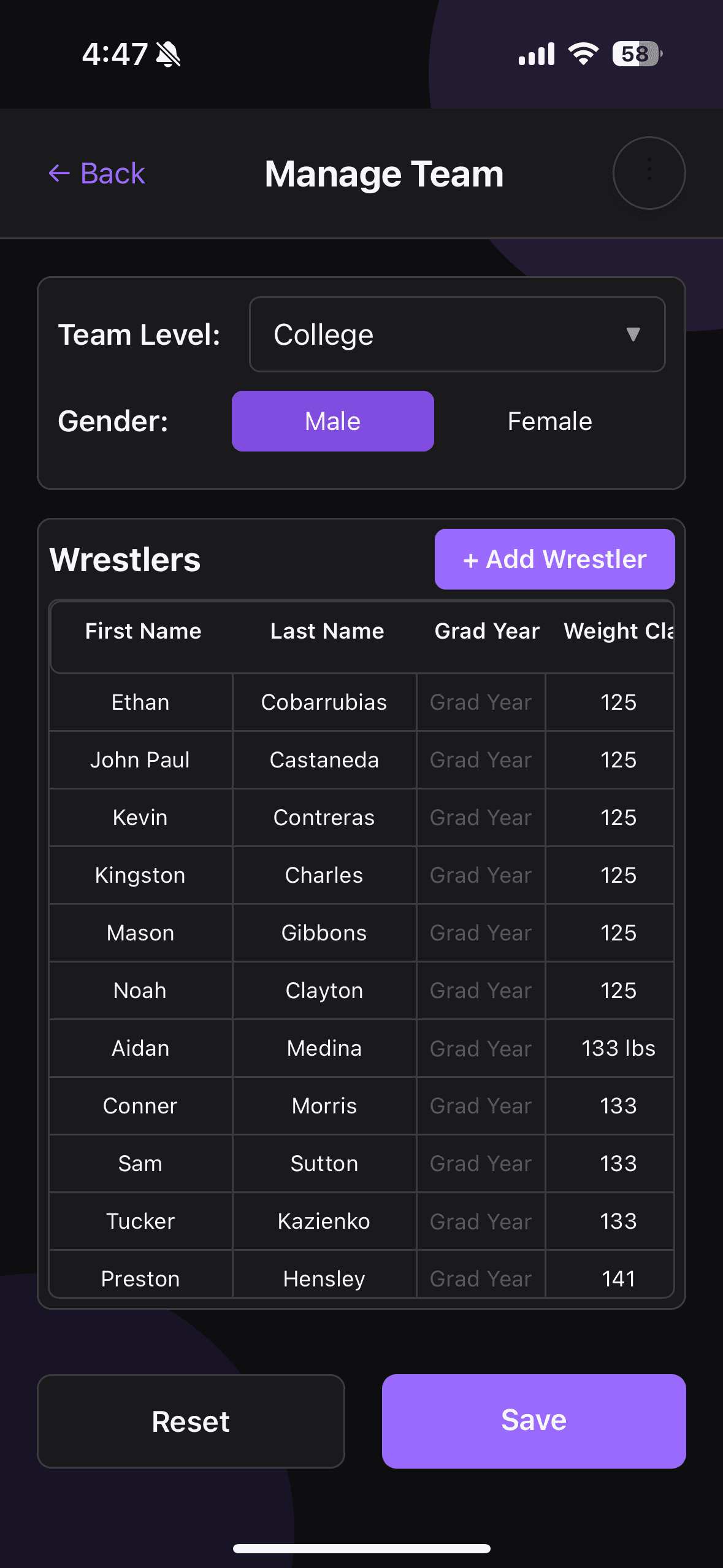
Team management handles roster setup by level, gender, and weight class so match tagging stays clean all season.

Manage team screen with roster table, gender toggle, and add wrestler action.

Screen

Manage Team

Roster controls for coaches and staff

Team LevelGenderAdd WrestlerSave

Primary Actions

SaveReset
Central roster management feeds the rest of the app.
Better team data means fewer mistakes in capture and search later.

Why Teams Choose MatchVault

A workflow your staff can learn quickly and keep using all season.

MatchVault is built for programs that want fewer missed recordings, cleaner organization, and faster film review after every dual, tournament, and practice block.

Capture and queue matches without adding chaos on competition day.

Keep every athlete, opponent, and event tied to the right video.

Bring film into practice, travel, and athlete meetings with less friction.